
dejuknow/md-redline
Developer tools이 페이지는 AI로 자동 번역되었습니다. 기술적인 세부 사항은 원문을 확인하세요. 원문 보기
Markdown specs에 대한 인라인 검토 의견. 내장 MCP 서버 손 피드백은 AI 에이전트에 직접.
개요
Markdown specs, prompts 및 docs에 대한 인라인 검토 의견. 렌더링 된 문서에 높은 텍스트, 코멘트를 남겨, 당신의 AI 에이전트는 직접 읽고 주소를 읽을 수 있습니다. 댓글은 .md 파일 자체에 보이지 않는 HTML 마커로 저장됩니다. sidecar 파일 없음, 데이터베이스 없음, 외부 없음. markdown 파일은 진실의 근원을 체재합니다. 내장 MCP 서버로, 리뷰는 두 방향으로 실행됩니다. 귀하의 에이전트는 귀하의 피드백을 보내 때까지 검토 중점 및 일시 중지를 요청할 수 있습니다, 또는 당신이 썼던 doc을 검토하고 당신을 위해 앵커된 의견을 남겨. 어느 방법: 복사 효력 없음, 컨텍스트 전환 없음. https://github.com/user-attachments/assets/8b9b3546-a895-42e1-b3cc-5ee5b2c00398] [T0]] [T0]] [T0]] [T0]] [T0]] [T0]] [T0]] [T0] [T0] [T0]] [T0] [T0] [T0]] [T0]] [T0] [T0] [T0] [T0] [T0]] [T0] [T0]] [T0] [T0] [T0]] [T0]] [T0] [T0] [T0]] https://github.com/user-attachments/assets/8b9b3546-a895-42e1-b3cc-5ee5b2c00398] https://github.com/user-attachments/assets/8b9b3546-a895-42e1-b3cc-5ee5b2c00398]]] https://github.com/user-attachments/assets/8b9b3546-a895-42e1-b3cc-5ee5b2c00398]]]]]] [[https://github.com/user-attachments/assets/8b9b3546-a895-42e1-b3cc-5ee5b2c00398]]]]]]] [[[[[[https://github.com/user-attachments/assets/8b9b3546-a895-42e1-b3cc-5ee5b2c00398]]]]]]]]]]]]]] [[[[[[[https://github.com/user-attachments/assets/8b9b3546-a895-42e1-b3cc-5ee5b2c00398]]]]]]]]]]]]]]]]]] [[[[[[[[[[[[[[[[[[[[[[ Claude Code, Claude Desktop, Codex CLI, Gemini CLI 및 다른 MCP 클라이언트와 협력하여 stdio 서버를 지원합니다. specs의 Sean Grove argues는 새로운 코드입니다, specs는 대리인 발달에 있는 일의 1 차적인 단위가 되고 있습니다. mdr는 코드 검토에 더 가까운 워크플로우 검토 도구를 제공합니다.
개요(AI 번역)
Markdown specs, prompts 및 docs에 대한 인라인 검토 의견.
렌더링 된 문서에 높은 텍스트, 코멘트를 남겨, 당신의 AI 에이전트는 직접 읽고 주소를 읽을 수 있습니다. 댓글은 .md] 파일 자체에 보이지 않는 HTML 마커로 저장됩니다. sidecar 파일 없음, 데이터베이스 없음, 외부 없음. markdown 파일은 진실의 근원을 체재합니다.
내장 MCP 서버로, 리뷰는 두 방향으로 실행됩니다. 귀하의 에이전트는 귀하의 피드백을 보내 때까지 검토 중점 및 일시 중지를 요청할 수 있습니다, 또는 당신이 썼던 doc을 검토하고 당신을 위해 앵커된 의견을 남겨. 어느 방법: 복사 효력 없음, 컨텍스트 전환 없음.
** 30 초 정도의 전체 리뷰 워크플로우 참조:**
https://github.com/user-attachments/assets/8b9b3546-a895-42e1-b3cc-5ee5b2c00398
Claude Code, Claude Desktop, Codex CLI, Gemini CLI 및 다른 MCP 클라이언트와 협력하여 stdio 서버를 지원합니다. specs의 Sean Grove argues는 새로운 코드입니다, specs는 에이전트 개발에서 작업의 1 차 단위가되고있다. mdr]는 워크 플로우 검토 코드 검토에 더 가까운 툴링을 제공합니다.
빠른 시작
필수품: Node 20 또는 newer.
필요한 경우 로컬 앱을 시작하고 브라우저에서 엽니다.
또는 글로벌 설치:
이 페이지는 AI로 자동 번역되었습니다. 기술적인 세부 사항은 원문을 확인하세요.
README
원문 README의 일부입니다. 원문 보기.
md-redline

Inline review comments for markdown specs, prompts, and design docs.
Highlight text in a rendered document, leave comments, and your AI agent can read and address them directly. Comments are stored as invisible HTML markers in the .md file itself. No sidecar files, no database, no external service. The markdown file stays the source of truth.
With the built-in MCP server, review runs in both directions. Your agent can request your review mid-task and pause until you send your feedback, or review a doc you wrote and leave anchored comments for you. Either way: no copy-paste, no context switching.
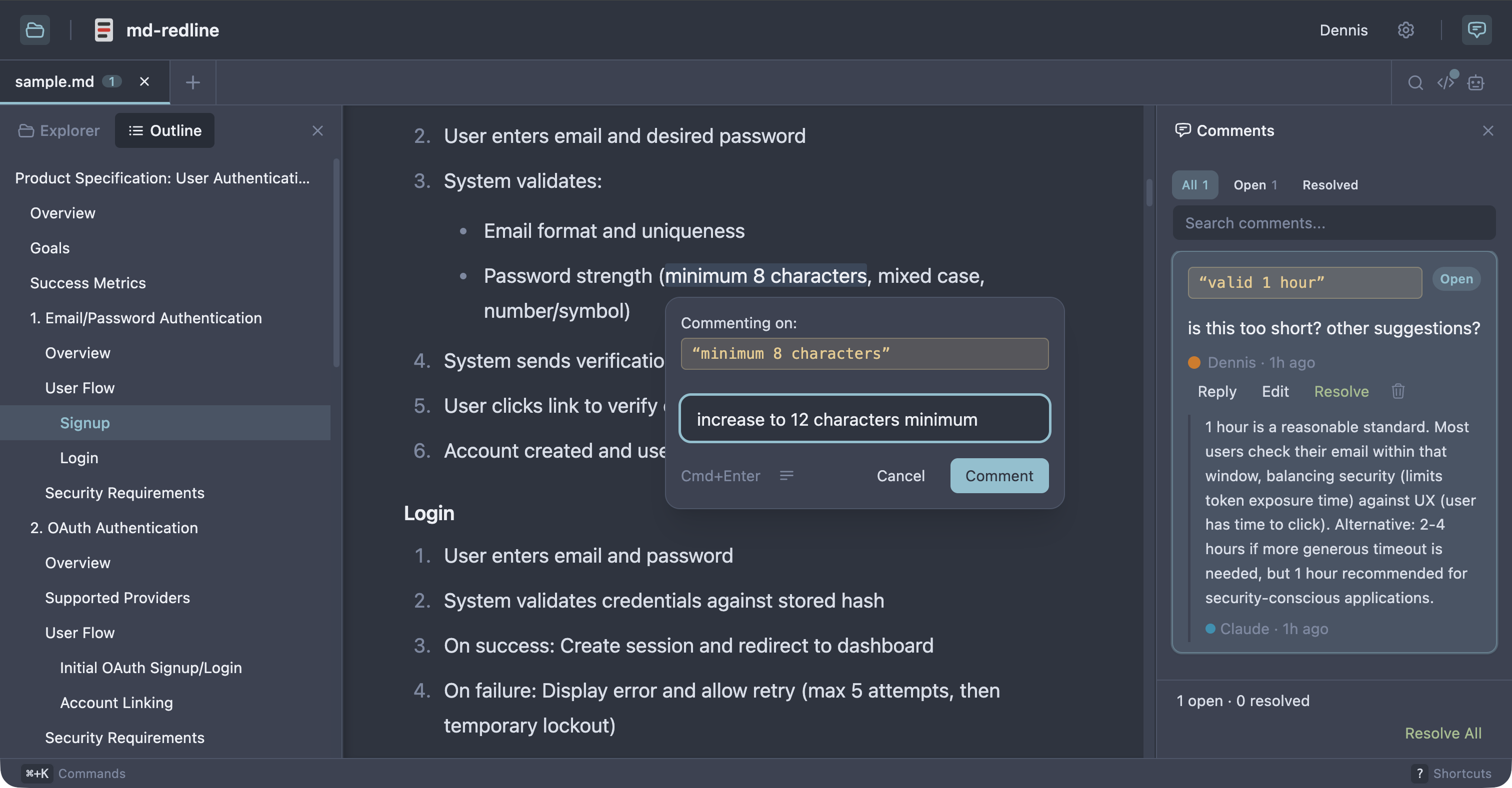
See the full review workflow in about 30 seconds:
https://github.com/user-attachments/assets/8b9b3546-a895-42e1-b3cc-5ee5b2c00398
Works with Claude Code, Claude Desktop, Codex CLI, Gemini CLI, and any other MCP client that supports stdio servers. As Sean Grove argues in specs are the new code, specs are becoming the primary unit of work in agentic development. mdr gives that workflow review tooling closer to code review.
Quick start
Prerequisite: Node 20 or newer.
npx md-redline /path/to/spec.md
This starts the local app if needed and opens it in your browser.
Or install globally:
npm install -g md-redline
mdr /path/to/spec.md        # Open a file
mdr /path/to/dir             # Open a directory
mdr --stop                   # Stop the running server
mdr sessions                 # List open review sessions (--kill ID ends one)
md-redline also works as an alias for mdr.
That gives you the viewer and commenting. The agent integration (reviews in both directions, anchored questions) comes from the MCP server, registered in the next section.
Updating
mdr checks npm once a day (from its local server, never blocking anything) and shows a small notice in the viewer and the terminal when a new version is out. Upgrading is one command:
npm install -g md-redline@latest
The running server restarts itself on the next mdr invocation after an
upgrade. To disable update checks entirely, set NO_UPDATE_NOTIFIER=1 (or
run in CI, which is auto-detected). Note this is a presence check, following
the ecosystem convention: any value, even 0 or empty, disables the checks.
MCP setup
Register the MCP server with your agent so it can request reviews mid-task.
Claude Code or Claude Desktop
mdr mcp install                   # register with both clients (default)
mdr mcp install --claude-code # just Claude Code (via `claude mcp add`)설치
npx md-redline /path/to/spec.md설정
{
  "mcpServers": {
    "md-redline": {
      "command": "mdr",
      "args": ["mcp"]
    }
  }
}