
daoyuanli2816/mcp-fence
Security testing이 페이지는 AI로 자동 번역되었습니다. 기술적인 세부 사항은 원문을 확인하세요. 원문 보기
Local-first 보안 스캐너, MCP 프로토콜 검사기, 동적 fuzzer, Docker sandbox 및 모델 Context 프로토콜 서버를 위한 보고서 생성기.
개요
로컬 최초의 보안 스캐너, MCP 프로토콜 검사기, 동적 fuzzer, Docker sandbox 및 서버용 보고서 생성기. mcp-fence는 개발자 도구입니다. mcp.json (또는 당신이 쓴 MCP 서버를 달리는)에 그것을 점하십시오: 1. 도구 독, 위험한 시작 명령, 일반 텍스트 비밀, 스키마 격차 및 unauthenticated HTTP 수송을위한 구성 및 소스. 2. 서버는 stdio에 살고 — 초기화, 도구/리스트를 실행하고, schemas/annotations를 수집합니다. 3. schema-aware payloads (path traversal, 명령 주입, SSRF, 신속한 주입, oversize 입력, 유형 혼란)를 가진 각 공구. 기본적으로 안전; --toy-mode 또는 --allow-unsafe를 통해 런타임 페이로드를 선택. 4. sensible 프로파일 (strict, filesystem-readonly, network-deny, dev)를 가진 Docker에 있는 어떤 stdio 서버. 5. 일반 텍스트 테이블, JSON, SARIF 2.1.0 ( GitHub 코드 스캔 용) 또는 완전 오프라인 HTML 페이지로 검색합니다. 그것은 , 및 용도입니다. 선택적 로컬 LLM 판단은 로컬 Ollama 또는 OpenAI 호환 엔드 포인트에 대해 이야기 할 수 있습니다.
개요(AI 번역)
국부적으로 첫번째 안전 스캐너, MCP 의정서 inspector, 동적인 fuzzer, Docker Sandbox 및 ** Model Context Protocol**에 대한 보고서 생성기 서버.
mcp-fence 개발자 도구입니다. mcp.json에서 포인트 (또는
MCP 서버를 실행하여 썼습니다.
1.Statically scan 도구 독에 대한 구성 및 소스,
위험한 시작 명령, 일반 텍스트 비밀, 스키마 간격, 및
unauthenticated HTTP 수송.
2. ** 검사 ** 서버는 stdio에 살고 있습니다 - 실행 initialize,
tools/list, schemas/annotations 수집.
3. ** Fuzz ** schema-aware 페이로드가있는 모든 도구 (path traversal,
명령 주입, SSRF, 신속한 주입, oversize 입력, 유형
주입). 기본적으로 안전; 런타임 페이로드를 선택
--toy-mode 또는 --allow-unsafe.
4.Sandbox sensible 프로파일을 가진 Docker에 있는 어떤 stdio 서버
(strict], filesystem-readonly], network-deny], dev).
5.Report 일반 텍스트 테이블, JSON, SARIF 2.1.0 (for
GitHub 코드 스캔), 또는 완전히 오프라인 HTML 페이지.
non-destructive, local-first, ** 클라우드 LLM 사용 기본값**. 선택적 로컬 LLM 판단은 로컬 Ollama 또는 OpenAI 호환 엔드포인트.
설치
이 페이지는 AI로 자동 번역되었습니다. 기술적인 세부 사항은 원문을 확인하세요.
README
원문 README의 일부입니다. 원문 보기.
Local-first security scanner, MCP protocol inspector, dynamic fuzzer, Docker sandbox, and report generator for Model Context Protocol servers.
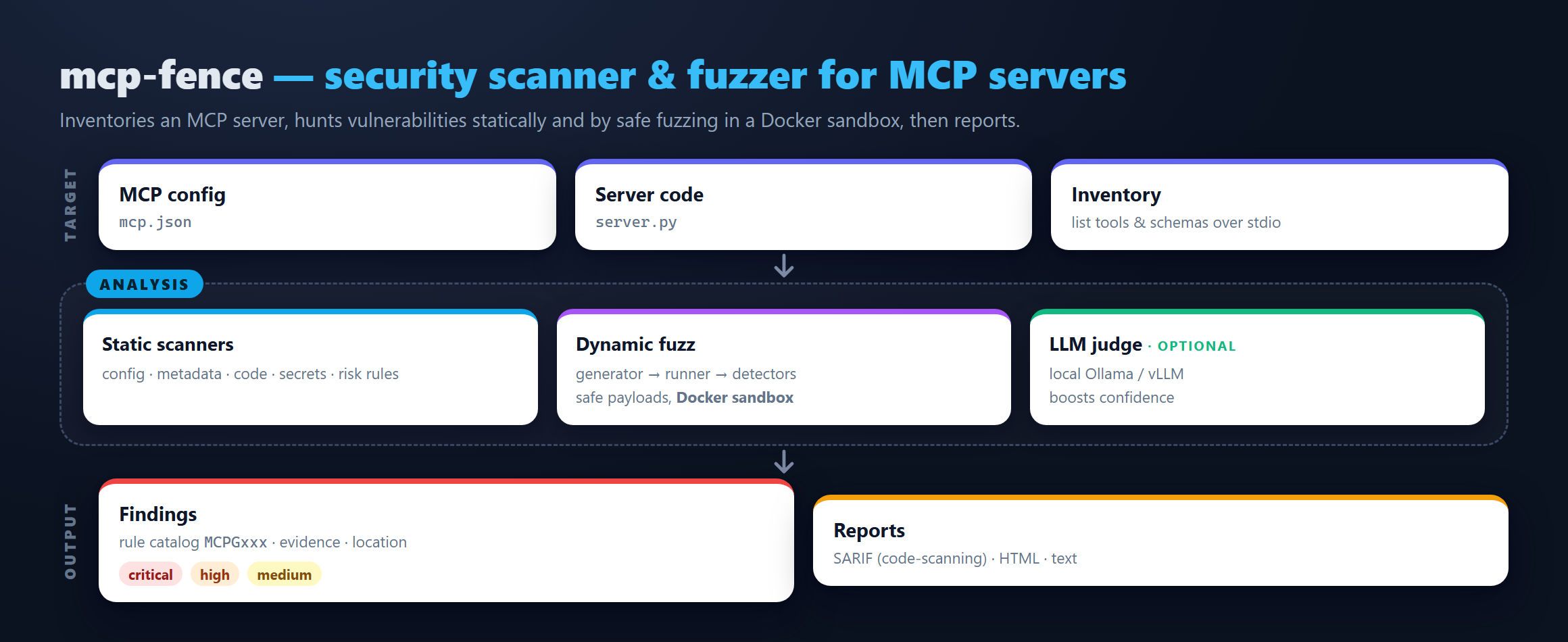
mcp-fence is a developer tool. Point it at your mcp.json (or any
running MCP server you wrote) and it will:
- Statically scan the config and source for tool poisoning, dangerous startup commands, plaintext secrets, schema gaps, and unauthenticated HTTP transports.
- Inspect the server live over stdio — runs
initialize,tools/list, gathers schemas/annotations. - Fuzz every tool with schema-aware payloads (path traversal,
command injection, SSRF, prompt injection, oversize input, type
confusion). Safe by default; opt in to runtime payloads via
--toy-modeor--allow-unsafe. - Sandbox any stdio server in Docker with sensible profiles
(
strict,filesystem-readonly,network-deny,dev). - Report findings as a plain-text table, JSON, SARIF 2.1.0 (for GitHub code scanning), or a fully offline HTML page.
It is non-destructive, local-first, and uses no cloud LLM by default. An optional local-LLM judge can talk to a local Ollama or OpenAI-compatible endpoint.
Install
From PyPI:
pip install mcp-fence
From source (for contributors):
git clone https://github.com/DaoyuanLi2816/mcp-fence
cd mcp-fence
python -m venv .venv
source .venv/bin/activate          # Windows: .venv\Scripts\activate
python -m pip install -e ".[dev]"
Requires Python 3.11+.
30-second quickstart
# 1. Bring up the bundled examples in your working directory.
mcp-fence init-example ./mcp-fence-examples

# 2. Static scan the intentionally poisoned metadata server.
mcp-fence scan mcp-fence-examples/vulnerable_metadata_server/mcp.json

# 3. Live-inspect the safe baseline.
mcp-fence inspect mcp-fence-examples/safe_server/mcp.json

# 4. Fuzz the arbitrary-file-read server.
mcp-fence fuzz mcp-fence-examples/vulnerable_filesystem_server/mcp.json

# 5. Generate a `docker run` command that sandboxes any of the above.설치
This server does not publish a one-line install command.
Open the repository installation guide MCP 초보자라면? mcpskill.org 가이드부터 시작하세요 →