
이 페이지는 AI로 자동 번역되었습니다. 기술적인 세부 사항은 원문을 확인하세요. 원문 보기
: 이 소프트웨어는 개발 초기 단계에 있으며 결함이 포함될 수 있습니다. github.com/aws-samples/sample-drawio-mcp/issues에 문제점을 열지 마십시오. 우리는 버그 보고서를 환영하고 PR을 받아들입니다.
개요
: 이 소프트웨어는 개발 초기 단계에 있으며 결함이 포함될 수 있습니다. github.com/aws-samples/sample-drawio-mcp/issues에 문제점을 열지 마십시오. 우리는 버그 보고서를 환영하고 PR을 받아들입니다. Create, read, and update draw.io 다이어그램 programmatically using AI Assistants. draw.io MCP 서버는 AI 조수가 자연 언어를 통해 로컬 컴퓨터에 기술 다이어그램을 구축 할 수 있습니다. AWS 아키텍처 다이어그램, flowchart 또는 네트워크 토폴로지 및 draw.io 형식으로 표시됩니다. 프로젝트는 2개의 주요 성분으로 이루어져 있습니다: - - mxGraph XML 구조를 조작하는 JavaScript/TypeScript 라이브러리 - AI Assistants에 다이어그램 작업을 노출하는 모델 Context Protocol 서버 JSAPI는 Node.js와 브라우저 환경에서 작업하는 draw.io 또는 mxGraph 런타임 의존성을 독립적으로 운영합니다. 모든 가동은 당신의 국부적으로 기계에 전적으로 실행합니다. 다이어그램 데이터, 원격 측정, 또는 정보는 네트워크를 통해 전송됩니다.
개요(AI 번역)
[!수신] ** Pre-Release Alpha Software **: 이 소프트웨어는 개발 초기 단계에 있으며 결함이 포함될 수 있습니다. github.com/aws-samples/sample-drawio-mcp/issues에 문제점을 열지 마십시오. 우리는 버그 보고를 환영하고 PR을 받아들입니다.
Create, read, and update draw.io 다이어그램 programmatically using AI Assistants.
##이 뭐죠?
draw.io MCP 서버는 AI 조수가 자연 언어를 통해 로컬 컴퓨터에 기술 다이어그램을 구축 할 수 있습니다. AWS 아키텍처 다이어그램, flowchart 또는 네트워크 토폴로지 및 draw.io 형식으로 표시됩니다.
️ 건축
프로젝트는 2개의 주요 성분으로 이루어져 있습니다:
- DrawIO JSAPI - mxGraph XML 구조를 조작하는 JavaScript/TypeScript 라이브러리
- MCP Server - AI 조수에 다이어그램 작업을 노출하는 모델 Context Protocol 서버
JSAPI는 Node.js와 브라우저 환경에서 작업하는 draw.io 또는 mxGraph 런타임 의존성을 독립적으로 운영합니다.
개인 정보 보호
모든 가동은 당신의 국부적으로 기계에 전적으로 실행합니다. 다이어그램 데이터, 원격 측정, 또는 정보는 네트워크를 통해 전송됩니다.
✨ 주요 특징
이 페이지는 AI로 자동 번역되었습니다. 기술적인 세부 사항은 원문을 확인하세요.
README
원문 README의 일부입니다. 원문 보기.
🎨 Draw.io MCP Server
[!WARNING] Pre-Release Alpha Software: This software is in an early stage of development and may contain defects. Please open issues at github.com/aws-samples/sample-drawio-mcp/issues — we welcome bug reports and accept PRs.
Create, read, and update draw.io diagrams programmatically using AI assistants.
🚀 What is This?
The draw.io MCP server enables AI assistants to build technical diagrams on your local computer through natural language. Ask for an AWS architecture diagram, a flowchart, or a network topology—and watch it appear in draw.io format.
🏗️ Architecture
The project consists of two main components:
- DrawIO JSAPI - A JavaScript/TypeScript library that manipulates mxGraph XML structures
- MCP Server - A Model Context Protocol server that exposes diagram operations to AI assistants
The JSAPI operates independently of draw.io or mxGraph runtime dependencies, working in both Node.js and browser environments.
🔒 Privacy First
All operations run entirely on your local machine. No diagram data, telemetry, or information is transmitted over the network.
✨ Key Features
- 📊 Create architecture diagrams with AWS, Kubernetes, and more icons!
- 🔄 Programmatically modify existing diagrams
- 🎯 Natural language diagram creation through AI assistants
- 🌐 Works in Node.js and browser environments
- 🔐 100% local operation with no network dependencies
🎯 Quick Example
You: "Create an AWS serverless architecture diagram with CloudFront, API Gateway,
container-based Lambda (pulling from ECR), connecting to Aurora PostgreSQL,
OpenSearch, S3, and Bedrock. Include Cognito for authentication, IAM roles,
and CodePipeline for deployment. Show the VPC and private subnet structure."

AI: [Generates a properly formatted draw.io diagram with official AWS icons]
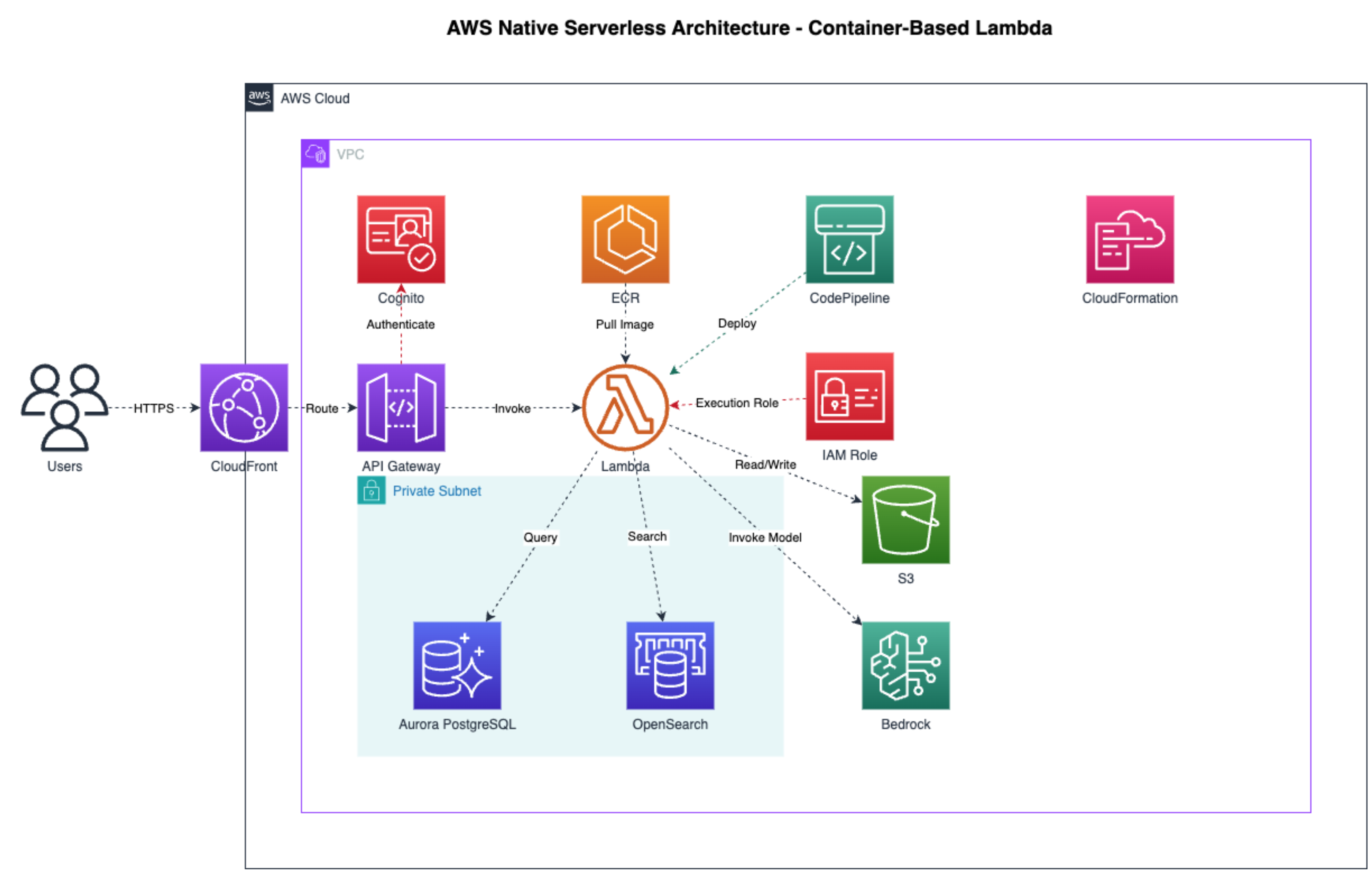
Example AWS architecture diagram generated by the MCP server. The resulting .drawio file can be edited manually in draw.io or programmatically by AI assistants like Kiro.
Getting Started
MCP Client Configuration
Add to your MCP client config (Claude Desktop, Claude Code, Kiro):
{
  "mcpServers": {
    "drawio": {
      "command": "npx",
      "args": [
        "-y",
        "https://github.com/aws-samples/sample-drawio-mcp/releases/latest/download/drawio-mcp-server-latest.tgz",
        "--no-cache"
      ],
      "type": "stdio"
    }
  }
}
See the full Installation Guide for version pinning, platform-specific config paths, and building from source.
📚 Documentation
- JSAPI - JavaScript API documentation for programmatic diagram creation
설치
npx -y https://github.com/aws-samples/sample-drawio-mcp/releases/latest/download/drawio-mcp-server-latest.tgz --no-cache설정
{
  "mcpServers": {
    "drawio": {
      "command": "npx",
      "args": [
        "-y",
        "https://github.com/aws-samples/sample-drawio-mcp/releases/latest/download/drawio-mcp-server-latest.tgz",
        "--no-cache"
      ],
      "type": "stdio"
    }
  }
}