
armorwallet/armor-crypto-mcp
Developer tools이 페이지는 AI로 자동 번역되었습니다. 기술적인 세부 사항은 원문을 확인하세요. 원문 보기
armorwallet/armor-crypto-mcp는 [[T0]에서 가져온 MCP 서버 후보입니다.
개요
armorwallet/armor-crypto-mcp는 [[T0]에서 가져온 MCP 서버 후보입니다.
개요(AI 번역)
알파 테스트 버전 0.1.24
AI 에이전트를 암호화폐 생태계에 통합하는 단일 소스입니다. 여기에는 지갑 생성 및 관리, 스왑, 전송, DCA와 같은 이벤트 기반 거래, 손절매 및 이익 실현 등 다양한 기능이 포함됩니다. Armor MCP는 알파 상태에서 솔라나를 지원하며, 베타 단계에서는 이더리움을 포함한 10개 이상의 블록체인을 지원합니다. 베이스, 아발란체, 비트코인, 수이, 베라체인, 메가ETH, 옵티미즘, 톤, BNB, 아비트럼 등이 포함됩니다. Armor의 MCP를 사용하면 통합 논리와 완전한 도구 세트를 갖춘 AI 에이전트에 모든 암호화폐를 통합할 수 있습니다.
특징
🧠 AI 네이티브
📙 지갑 관리
🔃 교환
🌈 특수 거래(DCA, 손절매 등)
⛓️ 멀티 체인
↔️ 교차 사슬 전이
🥩 스테이킹
🤖 에이전트 프레임워크로의 빠른 통합
👫 사회적 정서
🔮 예측
요구 사항
1. 파이썬이 설치되어 있는지 꼭 확인하세요
2. 설치 uv
리눅스 / 윈도우
맥
3. Claude 데스크톱이나 AI 에이전트가 MCP를 실행합니다
자세한 내용은 사용 및 구성을 참조하세요.
알파 테스트
이 페이지는 AI로 자동 번역되었습니다. 기술적인 세부 사항은 원문을 확인하세요.
README
원문 README의 일부입니다. 원문 보기.
Armor Crypto MCP
Alpha Test version 0.1.24
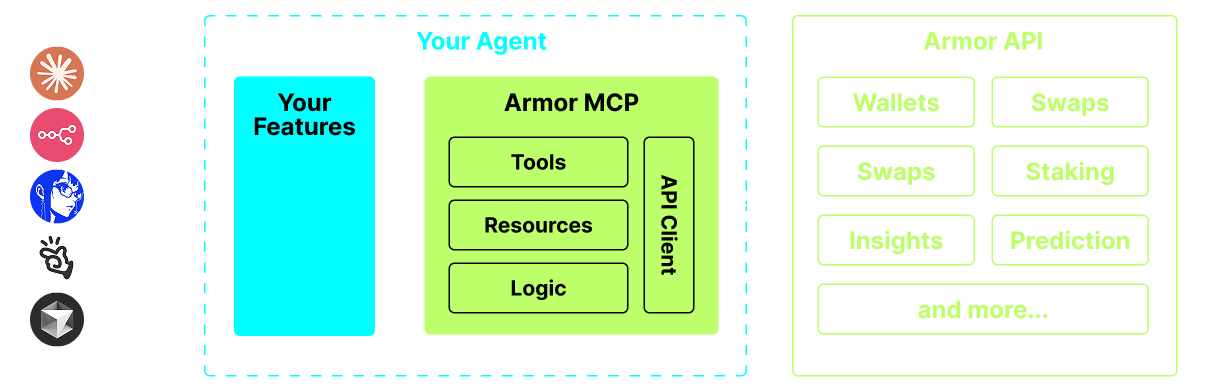
A single source for integrating AI Agents with the Crypto ecosystem. This includes Wallet creation and management, swaps, transfers, event-based trades like DCA, stop loss and take profit, and much more. The Armor MCP supports Solana in Alpha and, when in beta, will support more than a dozen blockchains, including Ethereum. Base, Avalanche, Bitcoin, Sui, Berachain, megaETH, Optimism, Ton, BNB, and Arbitrum, among others. Using Armor’s MCP you can bring all of crypto into your AI Agent with unified logic and a complete set of tools.
Features
🧠 AI Native
📙 Wallet Management
🔃 Swaps
🌈 Specialized trades (DCA, Stop Loss etc.)
⛓️ Multi-chain
↔️ Cross-chain transations
🥩 Staking
🤖 Fast intergration to Agentic frameworks
👫 Social Sentiment
🔮 Prediction
Requirements
1. Make sure you have python installed
2. Install uv
Linux / Windows
pip install uv
Mac
brew install uv
3. Claude Desktop or your AI Agent will run the MCP
See Usage & Configuration for details.
Alpha Testing
We are currently in pre-alpha, and we are testing the capabilities of various agents and agentic frameworks like Claude Desktop, Cline, Cursor, n8n, etc.
Current Features & Tools
- Wallet Management
- Grouping & Organization
- Archiving
- Swap & Trades
- Normal swap
- DCA (place / list / cancel)
- Scheduled Orders
- Limit Orders (place / list / cancel)
- Staking and Unstaking
- Token Search and Trending Tokens
- Statistical Calculator for accurate Analysis
- Supports Solana blockchain
Coming Soon
- More Blockchain Support
- Minting
- Armor Agents as a Tool (or A2A)
MCP Setup
Currently you need to have the Armor NFT to get an API Key. Get it here
Usage & Configuration
To use the Armor MCP with your agent, you need the following configuration, replace `` with your API key:
{
  "mcpServers": {
    "armor-crypto-mcp": {
      "command": "uvx",
      "args": ["armor-crypto-mcp@latest", "--version"],
      "env": {
        "ARMOR_API_KEY": ""
      }
    }
  }
}
Use in Claude Desktop
- Must have Developer Mode enabled
- Open Claude Desktop’s File Menu top left of the window.
- Go to File > Settings
- Under Developer, click Edit Configuration
- In the config file, insert the
armor-wallet-mcpsection from above - Make sure to replace the placeholder with your API key
- Save the file and start a new Chat in Claude Desktop
Use in Cline
설치
uvx armor-crypto-mcp@latest --version설정
{
  "mcpServers": {
    "armor-crypto-mcp": {
      "command": "uvx",
      "args": ["armor-crypto-mcp@latest", "--version"],
      "env": {
        "ARMOR_API_KEY": "<PUT-YOUR-KEY-HERE>"
      }
    }
  }
}