
ami3466/tomcp
Developer tools이 페이지는 AI로 자동 번역되었습니다. 기술적인 세부 사항은 원문을 확인하세요. 원문 보기
ami3466/tomcp는 https://github.com/ami3466/tomcp.에서 가져온 MCP 서버 후보입니다.
개요
ami3466/tomcp는 https://github.com/ami3466/tomcp.에서 가져온 MCP 서버 후보입니다.
개요(AI 번역)
어떤 웹사이트든 MCP 서버로 바꿔보세요
퀵 스타트
URL 앞에 tomcp.org/를 붙이세요:
그 주소는 MCP 서버입니다. 클라이언트에 추가하거나 URL을 붙여넣으세요 tomcp.org
왜 MCP에 가야 할까?
특정 API는 종종 AI 환각을 일으키고, 웹 검색은 신뢰할 수 없습니다. 이 도구는 문서를 MCP 서버로 제공하여 AI가 수동으로 복사 붙여넣기 없이 필요한 명확한 맥락에 직접 접근할 수 있게 해줍니다.
표준 [web_fetch 도구는 AI의 컨텍스트에 원시 HTML을 덤핑합니다—내비게이션바, 스크립트, 푸터, 노이즈. toMCP는 페이지를 가독성 파서에 통과시키고, 토큰의 일부를 사용해 깨끗한 마크다운으로 변환합니다.
지속 문서 컨텍스트
AI 어시스턴트는 문서가 없으면 API 세부사항을 환각으로 착각합니다. MCP 리소스는 영구적이고 읽기 전용 컨텍스트로 고정되어 있습니다 — 모델이 이를 건너뛰거나 잊지 않습니다. 프레임워크 문서, API 참조, 내부 팀 문서에 이상적입니다.
web_fetch 대 MCP 리소스
| web_fetch | MCP 리소스 | |
|---|---|---|
| 데이터 | 노이즈가 있는 원시 HTML | 깨끗한 마크다운 |
| 토큰 | 하이 | 로우 |
| 지속성 | 요청당 | 항상 이용 가능 |
| 환각 | 더 높은 | 더 낮은 |
이 페이지는 AI로 자동 번역되었습니다. 기술적인 세부 사항은 원문을 확인하세요.
README
원문 README의 일부입니다. 원문 보기.
toMCP
Turn any website into an MCP server
Quick start
Put tomcp.org/ in front of any URL:
https://tomcp.org/docs.stripe.com
That address is an MCP server. Add it to your client, or paste the URL at tomcp.org instead.
Why toMCP?
specific APIs often cause AI hallucinations, and web searching is unreliable. This tool lets you serve your documentation as an MCP server, giving the AI direct access to the clear context it needs without manual copy-pasting.
Standard web_fetch tools dump raw HTML into your AI’s context—navbars, scripts, footers, and noise. toMCP runs pages through a readability parser and converts to clean markdown, using a fraction of the tokens.
Persistent Documentation Context
AI assistants hallucinate API details when they lack documentation. MCP Resources are pinned as permanent, read-only context—the model won’t skip or forget them. Ideal for framework docs, API references, and internal team docs.
web_fetch vs MCP Resources
| web_fetch | MCP Resource | |
|---|---|---|
| Data | Raw HTML with noise | Clean markdown |
| Tokens | High | Low |
| Persistence | Per-request | Always available |
| Hallucination | Higher | Lower |
| JS Support | Full (SPAs / Dynamic) | Static Only (SSG) |
Demo
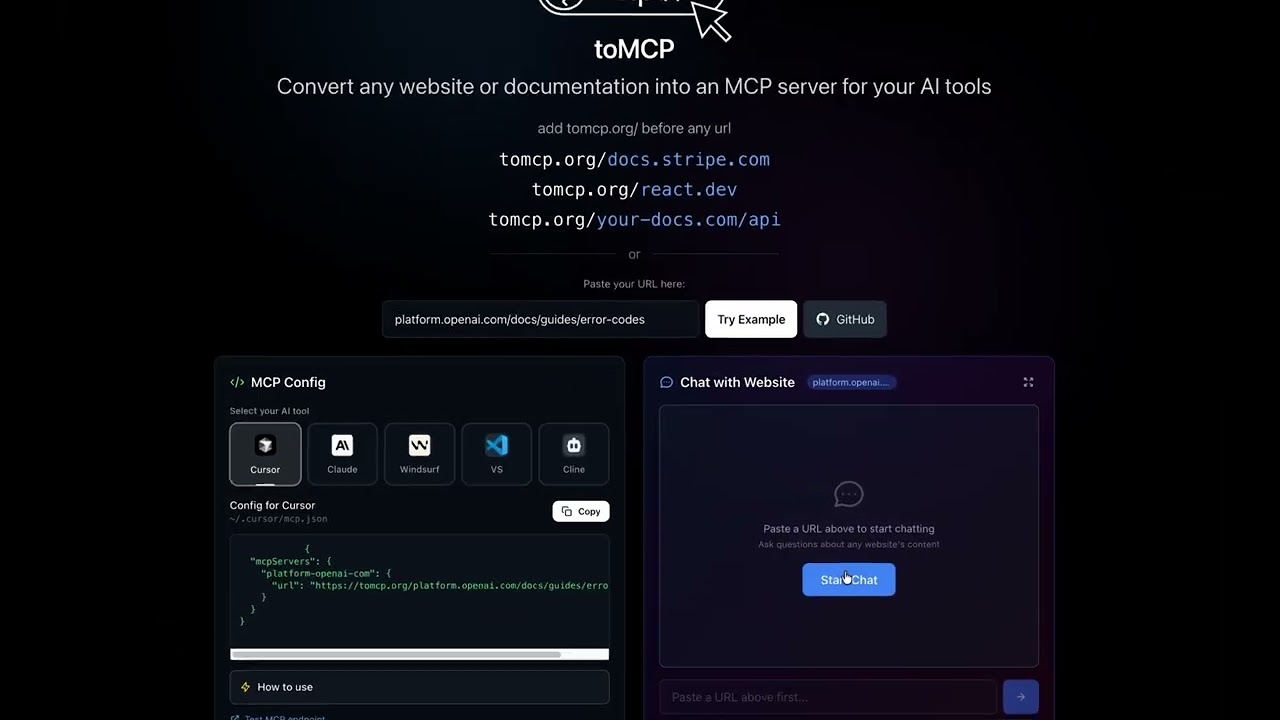
Supported AI Tools
- Cursor -
~/.cursor/mcp.json - Claude Desktop -
~/.claude/claude_desktop_config.json - Windsurf -
~/.codeium/windsurf/mcp_config.json - VS Code -
.vscode/mcp.json - Cline -
~/.cline/mcp_settings.json
How It Works
MCP Config
- Visit tomcp.org
- Enter any website URL
- Select your AI tool
- Copy the generated MCP config
- Add it to your tool’s config file
- Restart your AI tool
Chat
- Visit tomcp.org
- Paste any website URL
- Click “Start Chat”
- Ask questions about the website’s content
Example Config
{
  "mcpServers": {
    "docs-stripe-com": {
      "url": "https://tomcp.org/docs.stripe.com"
    }
  }
}
Chat API
curl -X POST https://tomcp.org/chat \
  -H "Content-Type: application/json" \
  -d '{"url": "docs.stripe.com", "message": "How do I create a payment intent?"}'
AI Models
Free Models (No API Key Required)
These models are available for everyone with no setup:
- Llama 3.1 8B (Meta) - Default model, fast and capable
- Hermes 2 Pro (NousResearch) - Great for reasoning
- Mistral 7B (Mistral) - Efficient instruction-following
- Gemma 7B LoRA (Google) - Lightweight and fast
paid Models (API Key Required)
Add your Cloudflare Workers AI API key to unlock these models:
- Llama 3.3 70B (Meta) - Most powerful Llama model
- DeepSeek R1 32B (DeepSeek) - Advanced reasoning
- Mistral Large (Mistral) - Enterprise-grade
설치
This server does not publish a one-line install command.
Open the repository installation guide MCP 초보자라면? mcpskill.org 가이드부터 시작하세요 →설정
{
  "mcpServers": {
    "docs-stripe-com": {
      "url": "https://tomcp.org/docs.stripe.com"
    }
  }
}